Notification channels
The ibexa/notifications package integrates the Symfony Notifier with Ibexa DXP.
You can use it to create notifications and send them through various channels such as email, SMS, communication platforms,
and the back office user notifications.
These notifications must not be confused with the notification bars or the user notifications:
| Notification category | Sent with | Description |
|---|---|---|
| Notification bars | TranslatableNotificationHandlerInterface |
Rendered as a message bar in the bottom-right corner. |
| User notifications | NotificationService |
Rendered as back office notification. |
| Channel-based notifications | NotificationServiceInterface |
Rendering depends on the channel assigned to the notification type. |
Unlike notification bars and user notifications, channel-based notifications don't have a predefined channel. You can configure how they are delivered to the user by using YAML configuration. Several channels are provided, and you can create your own.
The Ibexa\Contracts\Notifications\Service\NotificationServiceInterface
sends notifications, objects extending the Symfony\Component\Notifier\Notification\Notification class.
You can inject this notification service into your code to send the built-in or custom notification types.
Channel services implementing Symfony\Component\Notifier\Channel\ChannelInterface subscribe to a selection of notification types
and deliver notifications to users through various transports.
Subscribe to notifications
Some events generate notifications that you can deliver to the users through one or more channels.
Available notification types
Ibexa\Contracts\FormBuilder\Notifications\FormSubmittedIbexa\Contracts\Notifications\SystemNotification\SystemNotificationIbexa\Contracts\OrderManagement\Notification\OrderStatusChangeIbexa\Contracts\Payment\Notification\PaymentStatusChangeIbexa\Contracts\Shipping\Notification\ShipmentStatusChangeIbexa\Contracts\User\Notification\UserInvitationIbexa\Contracts\User\Notification\UserPasswordResetIbexa\Contracts\User\Notification\UserRegisterIbexa\Share\Notification\ContentEditInvitationNotificationIbexa\Share\Notification\ContentViewInvitationNotificationIbexa\Share\Notification\ExternalParticipantContentViewInvitationNotification
Available notification channels
You can list the notification channel services with the following command:
1 | |
actito- Notification forwarded as transactional emailbrowser- Notification forwarded as flash messagechat- Notification forwarded to a communication platform like Slack, Microsoft Teams, or Google Chatdesktop- Notification forwarded to desktop applications like JoliNotifemail- Notification forwarded to email addressesibexa- Notification forwarded as back office user notificationspush- Notification forwarded to specific applicationssms- Notification forwarded to phone numbers
Subscriptions configuration
You can find the default configuration in config/packages/ibexa.yaml and config/packages/ibexa_admin_ui.yaml.
You can modify it to define your own subscriptions.
This page contains several examples of subscriptions configuration.
Scopes may not merge as expected
Subscriptions defined for a scope may not merge with subscriptions from other scopes or from other files.
For example, default scope might not be merged within a siteaccess group scope.
To ensure you don't unsubscribe against your will,
always use the following command to check subscriptions for a siteaccess before and after any changes:
1 | |
Subscription example
The following example shows how you can deliver notifications about Commerce-related activities through Slack:
- Install the Slack Notifier package:
1 | |
- In a .env file, set the DSN to target a Slack channel or a Slack user:
1 | |
- Subscribe to notification types related to Commerce, such as order, payment, and shipment status changes.
For example, define the following configuration in a new
config/packages/notifications.yamlfile:
1 2 3 4 5 6 7 8 9 10 11 12 13 14 15 16 17 18 19 20 | |
Create a notification class
You can define a new notification type and assign a new set of channels to it, customizing how it's delivered.
It must extend the Symfony\Component\Notifier\Notification\Notification class
and can optionally implement interfaces required by specific channels.
- Some channels don't accept the notification if it doesn't implement their related notification interface. Those interfaces come with a method to specifically format the notification for the channel.
- Some channels accept every notification and have a default formatting if the notification doesn't implement their related notification interface.
| Channel | Specific notification interface | Accept any notification |
|---|---|---|
actito |
Symfony\Component\Notifier\Notification\EmailNotificationInterface |
No |
chat |
Symfony\Component\Notifier\Notification\ChatNotificationInterface |
Yes |
desktop |
Symfony\Component\Notifier\Notification\DesktopNotificationInterface |
Yes |
email |
Symfony\Component\Notifier\Notification\EmailNotificationInterface |
No |
ibexa |
Ibexa\Contracts\Notifications\SystemNotification\SystemNotificationInterface |
No |
push |
Symfony\Component\Notifier\Notification\PushNotificationInterface |
Yes |
sms |
Symfony\Component\Notifier\Notification\SmsNotificationInterface |
No |
The ibexa channel sends notifications to users through their profile menu, exactly as user notifications.
The SystemNotificationChannel uses the core NotificationService to do so.
Some channels don't need a recipient:
browser: Always sends a flash message to the current userchat: Always sends a message to the same connection resource
Notification sending
Use the objects from the Ibexa\Contracts\Notifications namespace to work with notifications.
The …\Service\NotificationServiceInterface::send() expects two arguments:
- The first argument is an
…\Value\NotificationInterface. This interface is implemented by the…\Value\Notification\SymfonyNotificationAdapterwhich allows you to wrap any class extendingSymfony\Component\Notifier\Notification\Notification. - The optional second argument is an array of
…\Value\RecipientInterface. This interface is implemented by the…\Value\Recipent\SymfonyRecipientAdapterused to wrapSymfony\Component\Notifier\Recipient\RecipientInterface.- This Symfony interface is implemented by
…\Value\Recipent\UserRecipientwhich can wrap classes implementing theIbexa\Contracts\Core\Repository\Values\User\UserReferenceinterface,- The
UserServicemethods to load a user are returning objects implementing thisUserReferenceinterface. - The
PermissionResolver::getCurrentUserReference()method is returning objects implementing thisUserReferenceinterface.
- The
- This Symfony interface is implemented by
For example, to send a notification, you often use a combination like the following:
1 2 3 4 5 6 7 8 9 10 11 12 13 14 | |
CommandExecuted example
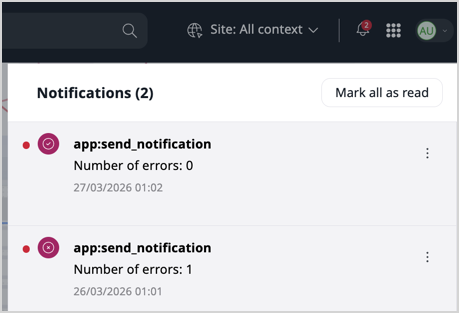
The following example is a command that sends a notification to users on several channels simultaneously. This example could be a scheduled task or cron job that warns users about its result.
- First, create a
CommandExecutednotification type. It supports two channels (ibexa,email), but could be extended to support more. As constructor arguments, an instance takes the command itself, the exit code of the run, and any caught exceptions.
1 2 3 4 5 6 7 8 9 10 11 12 13 14 15 16 17 18 19 20 21 22 23 24 25 26 27 28 29 30 31 32 33 34 35 36 37 38 39 40 41 42 43 44 45 46 47 48 49 50 51 52 53 54 | |
- Assign channels subscribed to this notification in
config/packages/notifications.yaml:
1 2 3 4 5 6 7 8 9 10 11 12 13 14 15 16 17 18 19 20 | |
- Create a command sending a
CommandExecutednotification at the end of execution: It randomly succeeds or fails to demonstrate how notifications can communicate different execution results. It could be declared as a service to set the list of recipients' logins ($recipientLogins) from a configuration file.
1 2 3 4 5 6 7 8 9 10 11 12 13 14 15 16 17 18 19 20 21 22 23 24 25 26 27 28 29 30 31 32 33 34 35 36 37 38 39 40 41 42 43 44 45 46 47 48 49 50 51 52 53 54 55 56 57 58 59 60 61 62 63 64 65 66 67 | |
When you execute this command, it fails randomly and notifies the Administrator user about the result.
ControllerFeedback example
The following example shows a custom notification sent by a controller and displayed as a flash message on the corresponding page in the browser.
The following ControllerFeedback notification type is a class that only extends the base:
1 2 3 4 5 6 7 8 9 | |
The ControllerFeedback notification is sent in a controller action:
1 2 3 4 5 6 7 8 9 10 11 12 13 14 15 16 17 18 19 20 21 22 23 24 25 26 27 28 | |
For the example, the notification is sent in a back office context for all editions and on the front end for Commerce edition. An empty template only extending the pagelayout is used for the demonstration.
templates/themes/admin/notification-sender-controller.html.twig:
1 | |
templates/themes/storefront/notification-sender-controller.html.twig:
1 | |
In the back office, a notification sent as a flash message has the ibexa-alert--notification CSS class.
This doesn't have a default style.
For this example, the style will be the same as an existing alert message type.
The assets/scss/notifications.scss declares the CSS class ibexa-alert--notification as being the same as the ibexa-alert--info CSS class
1 2 3 4 5 6 7 | |
This assets/scss/notifications.scss is added to the Admin UI layout in webpack.config.js:
1 2 3 4 5 6 7 8 9 10 11 12 13 | |
On the storefront, a notification sent as a flash message has the ibexa-store-notification--notification CSS class.
This class already has a default style applied.
Subscribe to this new notification type in config/packages/notifications.yaml:
- In the
admin_groupscope with thebrowserchannel - For Commerce edition, in the
storefront_groupscope with thebrowserchannel
1 2 3 4 5 6 7 8 9 10 11 12 13 14 15 16 17 18 19 20 21 22 23 24 25 26 27 28 29 30 31 32 33 34 35 36 37 38 39 40 41 42 43 44 45 | |
Subscriptions for storefront_group
Note that when introducing subscriptions configuration for the storefront_group scope that comes with Commerce edition,
several subscriptions had to be copy-pasted into this SiteAccess group to have the same subscriptions as before
when it was configured only by the default scope.
For example, the subscriptions for the site SiteAccess belonging to this group
can be checked with the following command during configuration:
1 | |
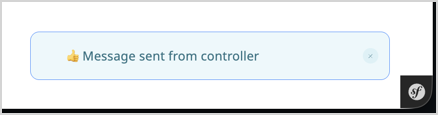
Reaching this controller in the back office (at /admin/notification-sender) triggers the notification as a flash message in the bottom-right corner:
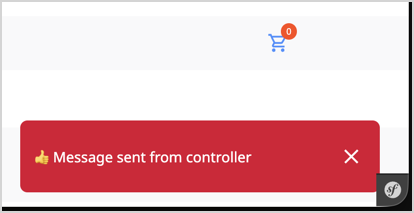
Reaching the controller in the default SiteAccess on Commerce edition (at /notification-sender) also triggers the notification as a flash message in the bottom-right corner:
Create a custom channel
You may need to create new channels to subscribe to notifications and send them to new destinations. For example, you could create a new channel for Slack that takes more than one DSN for finer dispatching.
A channel is a service implementing Symfony\Component\Notifier\Channel\ChannelInterface, and tagged notifier.channel alongside a channel identifier.
The following example is a custom channel that sends notifications to the logger.
1 2 3 4 5 6 7 8 9 10 11 12 13 14 15 16 17 18 19 20 21 22 23 24 25 26 27 28 29 30 | |
1 2 3 4 | |
Now, the CommandExecuted notification can be subscribed to the log channel:
1 2 3 4 5 | |
The log contains the notifications
(in var/log/dev.log when run in the dev Symfony environment):
1 2 3 | |